
GPU Acceleration
Firefox Hardware Video Acceleration
Configuring the nvidia-vaapi-driver
VAAPI acceleration in Firefox on Debian 12 is tricky because many of the components are broken with fixes hiding in newer versions that have yet to be released through Debian's repositories.
I was only able to get this working by manually building and installing the following updated packages:
- nvidia-driver v570.169
- nvidia-smi v570.169 (comes with manually installed nvidia-driver)
- nvidia-vaapi-driver v0.0.14
Other packages used (installed through Debian 12 repository):
- firefox-esr v128.11
- vainfo v2.12
Once you have installed the packages above you can verify nvidia-vaapi-driver is working by running vainfo:
user@debian:~$ vainfo
libva info: VA-API version 1.17.0
libva info: Trying to open /usr/lib/x86_64-linux-gnu/dri/nvidia_drv_video.so
libva info: Found init function __vaDriverInit_1_0
libva info: va_openDriver() returns 0
vainfo: VA-API version: 1.17 (libva 2.12.0)
vainfo: Driver version: VA-API NVDEC driver [direct backend]
vainfo: Supported profile and entrypoints
      VAProfileMPEG2Simple            :	VAEntrypointVLD
      VAProfileMPEG2Main              :	VAEntrypointVLD
      VAProfileVC1Simple              :	VAEntrypointVLD
      VAProfileVC1Main                :	VAEntrypointVLD
      VAProfileVC1Advanced            :	VAEntrypointVLD
      VAProfileH264Main               :	VAEntrypointVLD
      VAProfileH264High               :	VAEntrypointVLD
      VAProfileH264ConstrainedBaseline:	VAEntrypointVLD
      VAProfileHEVCMain               :	VAEntrypointVLD
      VAProfileVP8Version0_3          :	VAEntrypointVLD
      VAProfileVP9Profile0            :	VAEntrypointVLD
      VAProfileAV1Profile0            :	VAEntrypointVLD
      VAProfileHEVCMain10             :	VAEntrypointVLD
      VAProfileHEVCMain12             :	VAEntrypointVLD
      VAProfileVP9Profile2            :	VAEntrypointVLD
      VAProfileHEVCMain444            :	VAEntrypointVLD
Here we are looking to see that the driver has loaded without errors and that we are using the [direct backend]. If the driver is defaulting to the[egl backend] you can force it to use direct by setting the following environment variable:
export NVD_BACKEND=direct
Configuring Firefox
Before launching Firefox I recommend setting the following environment variable in your terminal to enable NV logging:
export NVD_LOG=1
Now launch Firefox using the following parameters:
MOZ_DISABLE_RDD_SANDBOX=1 firefox
In Firefox you will need to set the media.ffmpeg.vaapi.enabled option to true in the about:config page:
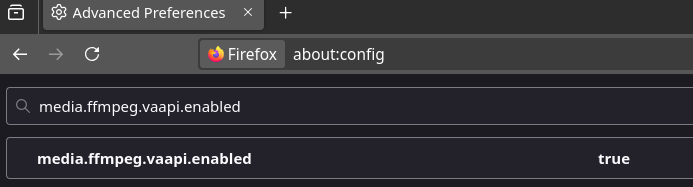
Now close Firefox and restart using the same command. To verify that video hardware decoding is working you can play a YouTube video and check the output of nvidia-smi:
user@debian:~$ nvidia-smi
Fri Jun 20 19:14:17 2025
+-----------------------------------------------------------------------------------------+
| NVIDIA-SMI 570.169                Driver Version: 570.169        CUDA Version: 12.8     |
|-----------------------------------------+------------------------+----------------------+
| GPU  Name                 Persistence-M | Bus-Id          Disp.A | Volatile Uncorr. ECC |
| Fan  Temp   Perf          Pwr:Usage/Cap |           Memory-Usage | GPU-Util  Compute M. |
|                                         |                        |               MIG M. |
|=========================================+========================+======================|
|   0  NVIDIA GeForce RTX 4090        Off |   00000000:06:00.0  On |                  Off |
|  0%   38C    P2             80W /  450W |    1090MiB /  24564MiB |      5%      Default |
|                                         |                        |                  N/A |
+-----------------------------------------+------------------------+----------------------+

+-----------------------------------------------------------------------------------------+
| Processes:                                                                              |
|  GPU   GI   CI              PID   Type   Process name                        GPU Memory |
|        ID   ID                                                               Usage      |
|=========================================================================================|
|    0   N/A  N/A             989      G   /usr/lib/xorg/Xorg                      317MiB |
|    0   N/A  N/A           33599      G   alacritty                                29MiB |
|    0   N/A  N/A           40272      G   ...ler --variations-seed-version         48MiB |
|    0   N/A  N/A           42045      G   alacritty                                15MiB |
|    0   N/A  N/A           49174      G   alacritty                                15MiB |
|    0   N/A  N/A           52330      G   firefox-esr                             130MiB |
|    0   N/A  N/A           55294    C+G   /usr/lib/firefox-esr/firefox-esr        423MiB |
+-----------------------------------------------------------------------------------------+
We are looking for a Firefox process with a Type or either C or C+G.
You can also use nvidia-smi pmon to show the usage of the decode engine:
user@debian:~$ nvidia-smi pmon
# gpu         pid   type     sm    mem    enc    dec    jpg    ofa    command
# Idx           #    C/G      %      %      %      %      %      %    name
    0      49174     G      -      -      -      -      -      -    alacritty
    0      52330     G      0      0      -      -      -      -    firefox-esr
    0      55294   C+G      1      0      -      4      -      -    firefox-esr
    0        989     G      1      0      -      -      -      -    Xorg
    0      33599     G      -      -      -      -      -      -    alacritty
    0      40272     G      -      -      -      -      -      -    chrome --type=g
    0      42045     G      -      -      -      -      -      -    alacritty
I had to bump up the video quality to 1080p@60 for it to show a usage greater than 0%.