
Blame
|
1 | # GPU Acceleration |
||||||
| 2 | ||||||||
|
3 | ## Firefox Hardware Video Acceleration |
||||||
| 4 | ### Configuring the nvidia-vaapi-driver |
|||||||
|
5 | As of Debian 13 (Trixie) it is now fairly easy to configure VAAPI hardware video acceleration as this release ships with an updated version of the `nvidia-vaapi-driver`. The only package that needs to be manually installed now is the `nvidia-driver`. |
||||||
|
6 | |||||||
|
7 | Tested working packages: |
||||||
| 8 | - nvidia-driver v570.169 (manually installed without the package manager) |
|||||||
| 9 | - nvidia-vaapi-driver v0.0.13 |
|||||||
|
10 | - firefox-esr v128.11 |
||||||
|
11 | - vainfo v2.22 |
||||||
|
12 | |||||||
|
13 | In the future when the Debian repository ships a newer release of the `nvidia-driver` make sure you also have the `libnvidia-encode1` package installed (this package already comes with the manually installed `nvidia-driver`). |
||||||
|
14 | |||||||
| 15 | Ensure you have the following kernel parameters set for the `nvidia-driver`: |
|||||||
| 16 | ||||||||
| 17 | `/etc/modprobe.d/nvidia.conf` |
|||||||
| 18 | ``` |
|||||||
| 19 | options nvidia-drm modeset=1 |
|||||||
| 20 | ``` |
|||||||
| 21 | ||||||||
| 22 | If this parameter is not currently set you will have to rebuild initramfs and reboot: |
|||||||
| 23 | ``` |
|||||||
| 24 | sudo mkinitramfs -u |
|||||||
| 25 | sudo reboot |
|||||||
| 26 | ``` |
|||||||
|
27 | |||||||
| 28 | Once you have installed the packages above you can verify `nvidia-vaapi-driver` is working by running `vainfo`: |
|||||||
| 29 | ``` |
|||||||
| 30 | user@debian:~$ vainfo |
|||||||
|
31 | Trying display: wayland |
||||||
| 32 | Trying display: x11 |
|||||||
| 33 | error: can't connect to X server! |
|||||||
| 34 | Trying display: drm |
|||||||
| 35 | libva info: VA-API version 1.22.0 |
|||||||
|
36 | libva info: Trying to open /usr/lib/x86_64-linux-gnu/dri/nvidia_drv_video.so |
||||||
| 37 | libva info: Found init function __vaDriverInit_1_0 |
|||||||
| 38 | libva info: va_openDriver() returns 0 |
|||||||
|
39 | vainfo: VA-API version: 1.22 (libva 2.22.0) |
||||||
|
40 | vainfo: Driver version: VA-API NVDEC driver [direct backend] |
||||||
| 41 | vainfo: Supported profile and entrypoints |
|||||||
| 42 | VAProfileMPEG2Simple : VAEntrypointVLD |
|||||||
| 43 | VAProfileMPEG2Main : VAEntrypointVLD |
|||||||
| 44 | VAProfileVC1Simple : VAEntrypointVLD |
|||||||
| 45 | VAProfileVC1Main : VAEntrypointVLD |
|||||||
| 46 | VAProfileVC1Advanced : VAEntrypointVLD |
|||||||
| 47 | VAProfileH264Main : VAEntrypointVLD |
|||||||
| 48 | VAProfileH264High : VAEntrypointVLD |
|||||||
| 49 | VAProfileH264ConstrainedBaseline: VAEntrypointVLD |
|||||||
| 50 | VAProfileHEVCMain : VAEntrypointVLD |
|||||||
| 51 | VAProfileVP8Version0_3 : VAEntrypointVLD |
|||||||
| 52 | VAProfileVP9Profile0 : VAEntrypointVLD |
|||||||
| 53 | VAProfileAV1Profile0 : VAEntrypointVLD |
|||||||
| 54 | VAProfileHEVCMain10 : VAEntrypointVLD |
|||||||
| 55 | VAProfileHEVCMain12 : VAEntrypointVLD |
|||||||
| 56 | VAProfileVP9Profile2 : VAEntrypointVLD |
|||||||
| 57 | VAProfileHEVCMain444 : VAEntrypointVLD |
|||||||
|
58 | VAProfileHEVCMain444_10 : VAEntrypointVLD |
||||||
| 59 | VAProfileHEVCMain444_12 : VAEntrypointVLD |
|||||||
|
60 | ``` |
||||||
| 61 | Here we are looking to see that the driver has loaded without errors and that we are using the `[direct backend]`. If the driver is defaulting to the`[egl backend]` you can force it to use `direct` by setting the following environment variable: |
|||||||
| 62 | ``` |
|||||||
| 63 | export NVD_BACKEND=direct |
|||||||
| 64 | ``` |
|||||||
| 65 | ||||||||
| 66 | ### Configuring Firefox |
|||||||
| 67 | Before launching Firefox I recommend setting the following environment variable in your terminal to enable NV logging: |
|||||||
| 68 | ``` |
|||||||
| 69 | export NVD_LOG=1 |
|||||||
| 70 | ``` |
|||||||
| 71 | ||||||||
| 72 | Now launch Firefox using the following parameters: |
|||||||
| 73 | ``` |
|||||||
| 74 | MOZ_DISABLE_RDD_SANDBOX=1 firefox |
|||||||
| 75 | ``` |
|||||||
| 76 | ||||||||
| 77 | In Firefox you will need to set the `media.ffmpeg.vaapi.enabled` option to `true` in the `about:config` page: |
|||||||
| 78 | 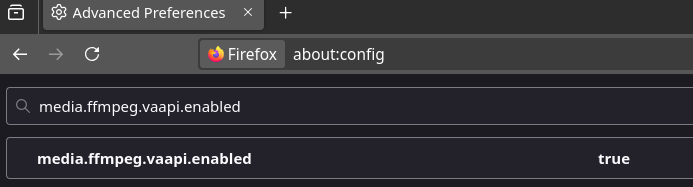 |
|||||||
| 79 | ||||||||
| 80 | Now close Firefox and restart using the same command. To verify that video hardware decoding is working you can play a YouTube video and check the output of `nvidia-smi`: |
|||||||
| 81 | ``` |
|||||||
| 82 | user@debian:~$ nvidia-smi |
|||||||
| 83 | Fri Jun 20 19:14:17 2025 |
|||||||
| 84 | +-----------------------------------------------------------------------------------------+ |
|||||||
| 85 | | NVIDIA-SMI 570.169 Driver Version: 570.169 CUDA Version: 12.8 | |
|||||||
| 86 | |-----------------------------------------+------------------------+----------------------+ |
|||||||
| 87 | | GPU Name Persistence-M | Bus-Id Disp.A | Volatile Uncorr. ECC | |
|||||||
| 88 | | Fan Temp Perf Pwr:Usage/Cap | Memory-Usage | GPU-Util Compute M. | |
|||||||
| 89 | | | | MIG M. | |
|||||||
| 90 | |=========================================+========================+======================| |
|||||||
| 91 | | 0 NVIDIA GeForce RTX 4090 Off | 00000000:06:00.0 On | Off | |
|||||||
| 92 | | 0% 38C P2 80W / 450W | 1090MiB / 24564MiB | 5% Default | |
|||||||
| 93 | | | | N/A | |
|||||||
| 94 | +-----------------------------------------+------------------------+----------------------+ |
|||||||
| 95 | ||||||||
| 96 | +-----------------------------------------------------------------------------------------+ |
|||||||
| 97 | | Processes: | |
|||||||
| 98 | | GPU GI CI PID Type Process name GPU Memory | |
|||||||
| 99 | | ID ID Usage | |
|||||||
| 100 | |=========================================================================================| |
|||||||
| 101 | | 0 N/A N/A 989 G /usr/lib/xorg/Xorg 317MiB | |
|||||||
| 102 | | 0 N/A N/A 33599 G alacritty 29MiB | |
|||||||
| 103 | | 0 N/A N/A 40272 G ...ler --variations-seed-version 48MiB | |
|||||||
| 104 | | 0 N/A N/A 42045 G alacritty 15MiB | |
|||||||
| 105 | | 0 N/A N/A 49174 G alacritty 15MiB | |
|||||||
| 106 | | 0 N/A N/A 52330 G firefox-esr 130MiB | |
|||||||
| 107 | | 0 N/A N/A 55294 C+G /usr/lib/firefox-esr/firefox-esr 423MiB | |
|||||||
| 108 | +-----------------------------------------------------------------------------------------+ |
|||||||
| 109 | ``` |
|||||||
| 110 | We are looking for a Firefox process with a `Type` or either `C` or `C+G`. |
|||||||
| 111 | ||||||||
| 112 | You can also use `nvidia-smi pmon` to show the usage of the decode engine: |
|||||||
| 113 | ``` |
|||||||
| 114 | user@debian:~$ nvidia-smi pmon |
|||||||
| 115 | # gpu pid type sm mem enc dec jpg ofa command |
|||||||
| 116 | # Idx # C/G % % % % % % name |
|||||||
| 117 | 0 49174 G - - - - - - alacritty |
|||||||
| 118 | 0 52330 G 0 0 - - - - firefox-esr |
|||||||
| 119 | 0 55294 C+G 1 0 - 4 - - firefox-esr |
|||||||
| 120 | 0 989 G 1 0 - - - - Xorg |
|||||||
| 121 | 0 33599 G - - - - - - alacritty |
|||||||
| 122 | 0 40272 G - - - - - - chrome --type=g |
|||||||
| 123 | 0 42045 G - - - - - - alacritty |
|||||||
| 124 | ``` |
|||||||
| 125 | I had to bump up the video quality to 1080p@60 for it to show a usage greater than 0%. |
|||||||
| 126 | ||||||||
| 127 | ### References |
|||||||
| 128 | - https://wiki.debian.org/Firefox#Nvidia |
|||||||
| 129 | - https://github.com/elFarto/nvidia-vaapi-driver |
|||||||